
Prerequisites:
Basic knowledge of how to use the Soarvo mobile application.
Basic knowledge of how to use the Soarvo web portal.
App Version:
0.0.141+
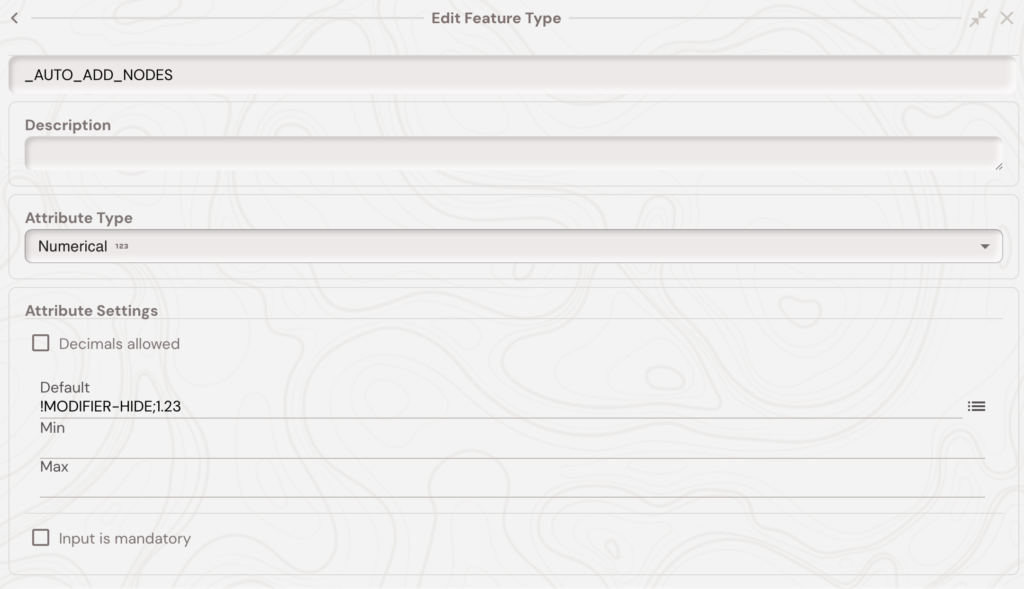
By adding a ‘_AUTO_ADD_NODES’ numeric attribute to a feature type with linear or area geometry you can enable the ‘Auto Add Nodes’ functionality on the Soarvo Mobile App. The image belows shows an example. The value of the attribute is ‘1.23’ which is the minimum distance between the last node of the geometry and your current distance before a new node (at your current position) is added – in metres. If the feature has no nodes then your current position is added as the first node.
The full default value is ‘!MODIFIER-HIDE;1.23’ where the first part, before the semi-colon, tells the app to hide this attribute in the Soarvo Mobile App form UI.
Once the linear or area feature is setup like above, you should be able to follow along with the video below and use the same ‘start / stop’ button to enable / disable auto adding nodes to the current features geometry.