Prerequisites:
Basic knowledge of how to use the Soarvo mobile application.
Basic knowledge of configurating and using the nordalp X6 PRO device.
App Version:
0.0.166+
This functionality is available on ANDROID ONLY and should only be abled on nordalp X6 PRO devices.
The X6 PRO RTK enabled device from nordalp integrates directly with the Soarvo Mobile application as a device position source. Below are the steps required to enable this.
nordalp RTK App Setup
A small amount of initial setup is required to be done in the nordalp RTK app.
Enable ‘GST’ NMEA messages for high accuracy readings. You may need to connect to the provider first to access the ‘Configuration’ menu. The video below shows this.
In the app settings, ensure ‘Auto Connect’ is unticked and set to ‘off’ for the provider, and ensure ‘Auto Connect’ is unticked and set to ‘off’ for Ntrip. As shown in the screenshot below.
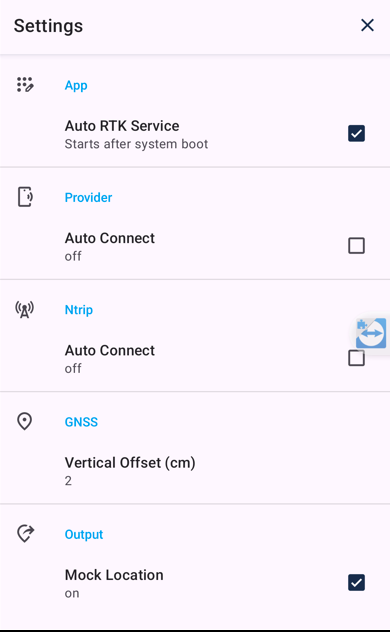
Ensure you tap ‘Disconnect’ if the provider is connected
You can now exit the nordalp RTK app. If you wish, you can ‘Force Stop’ the app via holding down on the RTK app icon, selecting ‘App Info’, and then choosing the ‘Force Stop’ option.
Soarvo Mobile App Setup
With the nordalp RTK app setup, you should be able to follow along with the below video for how to set the X6 PRO device as a position source within the Soarvo Mobile app. You can select any Soarvo location to open, in the video ‘Test1’ is selected.
In the ‘GPS and Device Manager’ page you should be able to see the source for the current position, it should be ‘Nordalp X6 Pro’.
You can also add NTRIP details for RTK corrections. As you enter the NTRIP URL the other NTRIP based settings become visible. The format for the settings is shown below. the NTRIP URL needs to be a valid URL, so follows the format ‘{PROTOCOL}://{SERVER_ADDRESS}:{PORT}